Quiet Forensics / ヘルプHelp / 外部公開診断Attack surface check
外部公開診断の使い方Using the attack surface check
自社のドメインを無料で診断し、ドメインの所有を確認して、指摘の詳細と直し方を見るまでの流れです。
Checking your domain for free, and verifying ownership to see the findings and fixes.
1. 診断する1. Run a check
外部公開診断のページでドメインを入力し、「診断する」を押します。公開情報だけで 21 項目を調べ、数十秒でスコア(100 点満点)、評価(A〜F)、重大度ごとの指摘の件数を表示します。会員登録は不要です。
Enter a domain in the attack surface check. In seconds you see the score, grade and the number of findings per severity. No sign-up.
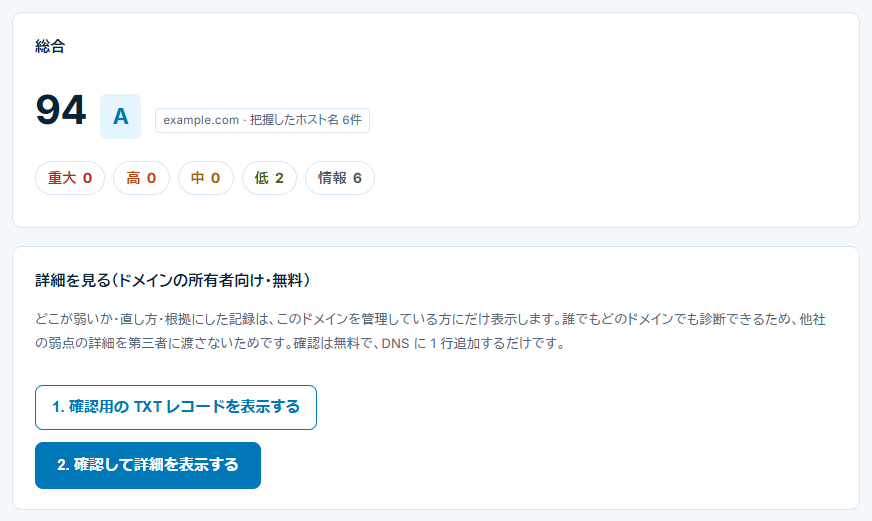
2. ドメインの所有を確認して詳細を見る(無料)2. Verify ownership to see the details (free)
- 結果の下の「1. 確認用の TXT レコードを表示する」を押します。
- ドメインを管理しているサービス(Cloudflare、お名前.com、Route 53 など)の DNS 設定画面で、表示された名前と値の TXT レコードを 1 件追加します。
- 数分待ってから「2. 確認して詳細を表示する」を押します。指摘の内容と直し方、根拠にした記録、資産マップが表示されます。
- Press "1. Show the TXT record" under the result.
- Add a TXT record with the shown name and value at your DNS provider.
- Wait a few minutes, then press "2. Verify and show the details".
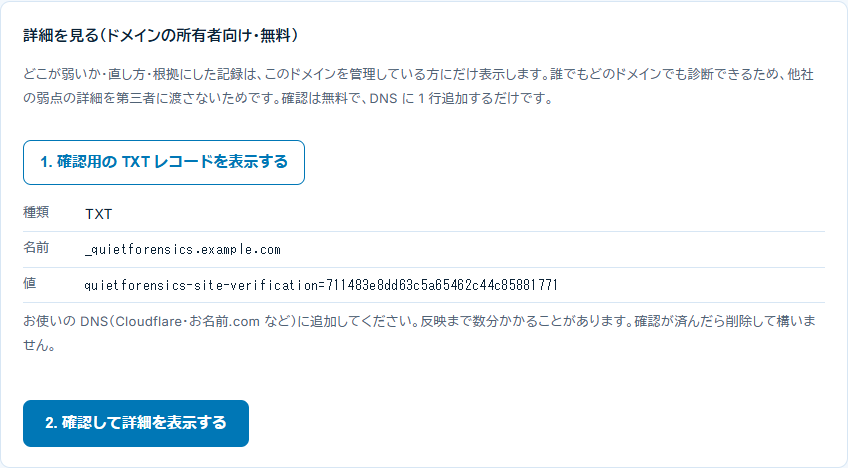
TXT レコードは、確認のたびにその場で調べます。レコードを消すと、詳細は見られなくなります。アカウントでドメインを確認しておけば、あとで TXT レコードを消しても、詳細と資産マップをいつでも見られます。
The record is checked live each time. Verify the domain in your account to keep access after removing it.
3. 他社と比べる3. Compare with others
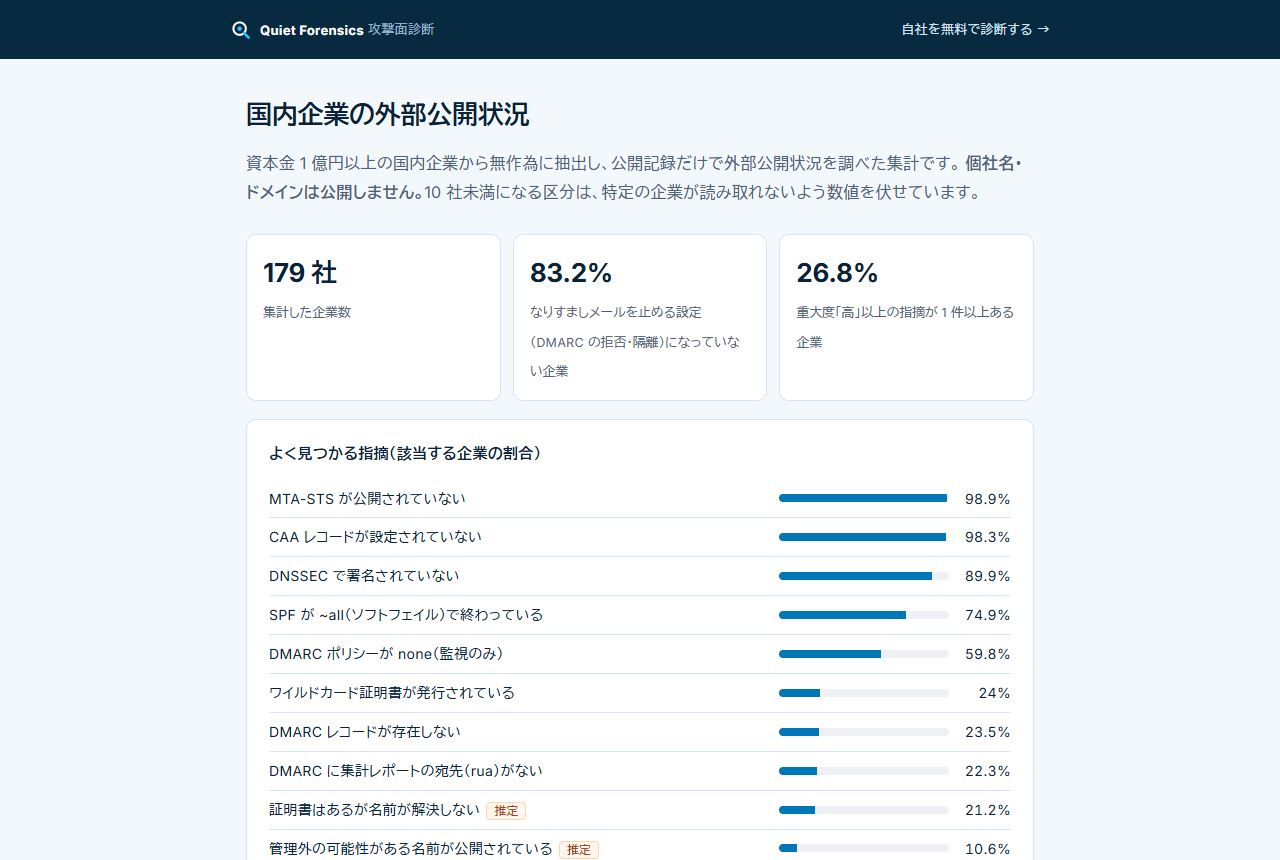
資本金 1 億円以上の国内企業を同じ方法で調べた統計を公開しています。個別の企業名は出していません。
A benchmark of Japanese companies with ¥100M+ capital, checked the same way, is published without names.
よくある質問FAQ
TXT レコードが見つからないと言われますThe TXT record is not found
DNS への反映には数分かかることがあります。名前は _quietforensics. から始まる表示どおりに、値も省略せずに全体を入力してください。確認は、サブドメインではなく会社のドメインで行ってください。
It can take a few minutes. Use the name and value exactly as shown, on the company domain rather than a subdomain.
診断で相手のサーバに通信しますかDoes it contact the server?
通常の診断(21 項目)は公開情報を読むだけで、診断のために相手のサーバへ通信することはありません。ドメインの所有を確認したあとは、追加の 8 項目(合計 29 項目)を調べるため、そのドメインのサイトや VPN などの入口、開発用のホストに 1 回ずつアクセスします。調べるのは、HTTP ヘッダなどの設定、入口に使われている製品の特定と、悪用が確認された脆弱性の一覧(CISA KEV)との照合、開発用のホストが認証なしで開けてしまわないか、です。
The check reads public records only. After ownership is proven, 8 more checks do contact the domain: HTTP headers on the site, plus one request each to its VPN-style entrances and development hosts to identify the product, match it against CISA KEV and see whether it opens without a login.
各項目の意味を知りたいWhat does each finding mean?
検査項目の解説に、項目ごとの危険な理由、直し方、直ったことの確かめ方をまとめています。
See the check guide: why it matters, the fix, and how to confirm it.